| Author |
Message |
sweatervest
Ree-Yees
Joined: 22 Apr 2008
|
 Posted: May 03, 2008 05:33 Post subject: Posted: May 03, 2008 05:33 Post subject: |
   |
|
sheepandshepherd wrote:
lucius wrote:
As for the crosshairs, I'm a little concerned that adding crosshairs won't look right for DF. I was thinking of maybe doing a laser sight, essentially it would show up as a red dot that changes size, projected onto the geometry. But I'll wait and get people's opinions first. Of course if you're using an inaccurate weapon, like the Stormtrooper Rifle, you won't hit exactly where the dot/crosshair is.
I use a very high resolution (1920x1200), and that makes it hard to aim. I think adding an optional crosshair that can be disabled in the settings would be the best approach . . . or maybe in the future, when you have time, you could have multiple options for crosshairs, such as the laser sight. But for now, if it's not a problem with anyone, I think a simple + shaped crosshair would be best . . .
And as for the sprites always facing the camera, you meant only the explosion sprites, right?
I agree, in addition to high res I also have a large monitor so the crosshair just helps tell me where the center of the screen is. I thought of it when I started a run and aimed up to shoot the stormtrooper on the ledge to the left but started shooting too low because I wasn't sure I had him centered. I like this is some games, like Turok has no kind of crosshair and for some reason it goes quite well with its gameplay. I think one thing about DF is the weapons are sprites and don't give as good of a sense of direction that a model would. I remember when I first started playing jDoom a little while back I tried it without a crosshair and had alot of trouble aiming vertically. Ultimately though I think it should just be an option, and the laser idea sounds really neat, it would be quite a unique addition. I programmed a crosshair in Unreal Tournament that raytraced to see where the gun would actually shoot (I got the idea from Serious Sam) like what you said about the laser, and it ended up being one of my favorite little tweaks (like watching it follow a shock rifle projectile before you shoot it).
Also, when I was talking about sprites always facing you, I was only talking about things like explosions, projectiles, etc. I don't think the rendering for enemies, pickups, etc. should change.
|
|
lucius
DarkXL Developer

Joined: 17 Feb 2008
|
|
>origami<
Dianoga
Joined: 03 May 2008
|
| Posted: May 03, 2008 15:42 Post subject: |
|
|
Hi. Just registered here to say I'm really happy to see the work that has been produced on this enhancement to the original game and that I look forward to future releases.
Played through the first level on the latest build with no noticeable problems.
My system :
Processor: Intel Core2 Duo-E4500
Motherboard: Gigabyte GA-P35-DS3/S3
RAM: 2 Gigs of Generic RAM
Video: ATI HD2600XT
Audio: Onboard Realtek HD Audio
OS: Vista Ultimate 32bit SP1
|
|
sheepandshepherd
Trandoshan
Joined: 01 Apr 2008
|
| Posted: May 03, 2008 17:17 Post subject: |
|
|
lucius wrote:
sweatervest wrote:
Also, when I was talking about sprites always facing you, I was only talking about things like explosions, projectiles, etc. I don't think the rendering for enemies, pickups, etc. should change.
That's what I thought you meant  None of that other stuff is changing other then at extreme angles to attempt to avoid being to see it edge on. None of that other stuff is changing other then at extreme angles to attempt to avoid being to see it edge on.
Good, that would look really wierd if enemies always faced the player . . . one thing that annoyed me sometimes though was the shield sprite, it seemed to get smaller when you got closer to it. I guess there's not much you can do about it until someone decides to make a 3do for it . . .
By the way, I had a problem with build 5 - the first time I started it, the screen turned white and froze, and I had to restart my computer. Fortunately, it was only the first time . . . I had it in fullscreen mode that time, and switched to windowed mode the second time. I'm not sure if that had anything to do with it, but I'd rather not test it; my computer is unhealthy enough already.
And thanks a lot for the screenshot key, it's helping me out a lot. You might even want to keep it in there for the final release.
|
|
lucius
DarkXL Developer
Joined: 17 Feb 2008
|
| Posted: May 03, 2008 21:40 Post subject: |
 |
|
sheepandshepherd wrote:
By the way, I had a problem with build 5 - the first time I started it, the screen turned white and froze, and I had to restart my computer. Fortunately, it was only the first time . . . I had it in fullscreen mode that time, and switched to windowed mode the second time. I'm not sure if that had anything to do with it, but I'd rather not test it; my computer is unhealthy enough already.
And thanks a lot for the screenshot key, it's helping me out a lot. You might even want to keep it in there for the final release.
I plan on keeping the screenshot key forever, although the exact key its mapped to may change of course. As for the crash, the fact that it happened for you in fullscreen but not windowed is perhaps a clue to the problem BlazingPhoenix is having...
Blazing Phoenix, can you try the last build in windowed mode and let me know if it crashes still?
_________________
DarkXL....http://darkxl.wordpress.com |
|
lucius
DarkXL Developer
Joined: 17 Feb 2008
|
| Posted: May 04, 2008 08:52 Post subject: Collision... |
|
|
Well I've finally got the collision issues worked out with adjoins. I will be making a build tomorrow, with the fixed collisions and some other bugs fixed.
_________________
DarkXL....http://darkxl.wordpress.com |
|
ACE
Ree-Yees
Joined: 10 Nov 2007
|
| Posted: May 04, 2008 16:50 Post subject: |
|
|
Fantastic Job Lucius!The high res looks so clean!the only problem I have is When I start the level theres that emenmy standing to the left of the shaft you start in and I tried to shoot him and the laser just passed right through him. I know the The_Mega_ZZTer mentioned this but I noticed that the shot kyle fires only hits the troopers middle body area. and my question to you is: in the future would it be possible to implement head shots that kill faster or shots that can hit any part of the body?
|
|
The MAZZTer
Death Star

Joined: 25 Sep 2003
|
| Posted: May 04, 2008 17:23 Post subject: |
|
|
Head shots aren't present in Dark Forces so shouldn't really be implemented, at least not in this first phase where IMO we should aim for compatibility and accuracy first and foremost.
I think the shots going for the torso is some type of auto-aim implemented, although it seems less agressive than DF's. It will probably be togglable.
_________________
http://www.mzzt.net/ | I am a respectable admin with a respectable sig. |
|
lucius
DarkXL Developer
Joined: 17 Feb 2008
|
|
sweatervest
Ree-Yees
Joined: 22 Apr 2008
|
| Posted: May 04, 2008 19:13 Post subject: |
|
|
The_Mega_ZZTer wrote:
Head shots aren't present in Dark Forces so shouldn't really be implemented, at least not in this first phase where IMO we should aim for compatibility and accuracy first and foremost.
I think the shots going for the torso is some type of auto-aim implemented, although it seems less agressive than DF's. It will probably be togglable.
Agreed. Especially since without a source code this is a bit of an exercise in reverse engineering so getting every little aspect about DarkXL just the same as in DF should be the first step (IMO). Then that would sort of function as the new source code for DF (since if it perfectly recreates the original, what prupose would the original have other than as a reference?) to which additions and improvements/modifications can be made.
I thought the problem with shots passing through had to do with shots changing sectors (for example when shooting the first guy from the shaft, which I am assuming is its own sector), because if anything I've noticed that the blaster shots in DarkXL are too prone to collision, most notably when trying to shoot over a short wall.
I don't know how hard this would be, but with respect to the question of including the second level with the next build, I propose that, as long as this isn't more work than it is worth, in one of the next builds we can choose to load ANY level, with of course no guarantee that any after the first will play through or even load at all. I don't know about anyone else but I'd have fun messing around in half-working DF levels. Also that could get us informal testers already peeking into the later game to see just what isn't working yet.
|
|
lucius
DarkXL Developer
Joined: 17 Feb 2008
|
| Posted: May 04, 2008 19:35 Post subject: Blaster shots and levels... |
|
|
sweatervest wrote:
I thought the problem with shots passing through had to do with shots changing sectors (for example when shooting the first guy from the shaft, which I am assuming is its own sector), because if anything I've noticed that the blaster shots in DarkXL are too prone to collision, most notably when trying to shoot over a short wall.
There are two problems here, I need to fix both: 1) shots start too low from the character causing them to hit the floor too soon if looking down or to hit ledges if too close. Where the shot ends is correct, though, so this is only a problem up close, 2) if an enemy or player is really close to an adjoin - it won't try to properly intersect the bolt "ray" with the enemy.
Shots used to hit on invisible adjoins but that shouldn't be problem anymore.
sweatervest wrote:
I don't know how hard this would be, but with respect to the question of including the second level with the next build, I propose that, as long as this isn't more work than it is worth, in one of the next builds we can choose to load ANY level, with of course no guarantee that any after the first will play through or even load at all. I don't know about anyone else but I'd have fun messing around in half-working DF levels. Also that could get us informal testers already peeking into the later game to see just what isn't working yet.
This might be a good idea later, but not for now. Its not that created the menus and jumping to different levels is hard - I have to do this stuff anyway to support any other levels - but I want the levels to work well enough to be presentable and not cause any serious issues. In addition I'd get bugs from all of them and I'd rather focus on a limited set of problems at a time. This also allows for more focused testing. As more features are implemented, levels will become supported in larger sets and eventually they will all be available. There will be a point where everything's implemented well enough and there's not more point of limiting which levels are loadable - but we're not there yet.
If anyone else wants to comment on this, that would be good.
_________________
DarkXL....http://darkxl.wordpress.com |
|
Emon
Ree-Yees
Joined: 10 Aug 2007
|
| Posted: May 04, 2008 21:30 Post subject: |
|
|
There's a bug in (I assume) the parser for DXL_Settings.txt. My path to DF is D:\Games\Dark Forces, but it didn't like the space in the path. I had to use D:\Games\DarkFo~1 instead.
|
|
Emon
Ree-Yees
Joined: 10 Aug 2007
|
| Posted: May 04, 2008 21:44 Post subject: |
|
|
Okay, I just played through the first level while listening to Lundquist's unofficial soundtrack, it was pretty awesome.
I have to hand it to you, Lucious, this is pretty impressive. Given the relatively short amount of time you've been working on this project, you've gotten an amazing amount done.
|
|
lucius
DarkXL Developer
Joined: 17 Feb 2008
|
|
Emon
Ree-Yees
Joined: 10 Aug 2007
|
| Posted: May 04, 2008 22:54 Post subject: |
|
|
Oh, right, sorry.
Core 2 Duo E4300, Radeon X1650XT, 2 GB of RAM, Vista SP1. I ran the game at 1280x960. I'm using Catalyst 8.4 drivers.
I had to install DirectX 9 in order to get it working, though. One of the D3D 9 DLLs, d3dx9_32.dll, wasn't available. You might want to either inform Vista users of this, or just package d3dx9_32.dll with DarkXL.
|
|
BlazingPhoenix
Ree-Yees
Joined: 22 Mar 2008
|
| Posted: May 04, 2008 22:58 Post subject: |
|
|
lucius wrote:
sheepandshepherd wrote:
By the way, I had a problem with build 5 - the first time I started it, the screen turned white and froze, and I had to restart my computer. Fortunately, it was only the first time . . . I had it in fullscreen mode that time, and switched to windowed mode the second time. I'm not sure if that had anything to do with it, but I'd rather not test it; my computer is unhealthy enough already.
And thanks a lot for the screenshot key, it's helping me out a lot. You might even want to keep it in there for the final release.
I plan on keeping the screenshot key forever, although the exact key its mapped to may change of course. As for the crash, the fact that it happened for you in fullscreen but not windowed is perhaps a clue to the problem BlazingPhoenix is having...
Blazing Phoenix, can you try the last build in windowed mode and let me know if it crashes still?
It still crashes. 
|
|
lucius
DarkXL Developer
Joined: 17 Feb 2008
|
| Posted: May 04, 2008 23:00 Post subject: |
|
|
Emon wrote:
Oh, right, sorry.
Core 2 Duo E4300, Radeon X1650XT, 2 GB of RAM, Vista SP1. I ran the game at 1280x960. I'm using Catalyst 8.4 drivers.
I had to install DirectX 9 in order to get it working, though. One of the D3D 9 DLLs, d3dx9_32.dll, wasn't available. You might want to either inform Vista users of this, or just package d3dx9_32.dll with DarkXL.
I originally packaged the DLL with the builds Anyway the better solution, is to put a link to Microsoft's web installer for DirectX and ask user to run that. I'll update the initial post now and the website later. Thanks for reminding me.
Thanks for the information.
_________________
DarkXL....http://darkxl.wordpress.com |
|
lucius
DarkXL Developer
Joined: 17 Feb 2008
|
| Posted: May 04, 2008 23:02 Post subject: |
|
|
BlazingPhoenix wrote:
It still crashes.
Thanks for trying. I'll put optional logging into the next build so hopefully I can use that to figure out why its crashing for you. I've been fixing some minor things that may actually fix the problem - but without being able to reproduce it I can't tell for sure. Thanks for helping me find the problem by testing.
_________________
DarkXL....http://darkxl.wordpress.com |
|
ACE
Ree-Yees
Joined: 10 Nov 2007
|
| Posted: May 05, 2008 03:38 Post subject: |
|
|
Acer Aspire windows vista 32-bit with AMD Athlon 64 Duel Core processor 4400+ 2.30 GHz with an Nvidia Geforce 8500 griphics card 1022 GB ram and i ran the game with 1600x1200 res.
|
|
The MAZZTer
Death Star
Joined: 25 Sep 2003
|
| Posted: May 05, 2008 04:34 Post subject: |
|
|
You can have him send you a Process Monitor dump. Then you compare it to a Process Monitor dump on a system where it doesn't crash and you should get more info on where it's crashing.
_________________
http://www.mzzt.net/ | I am a respectable admin with a respectable sig. |
|
lucius
DarkXL Developer
Joined: 17 Feb 2008
|
| Posted: May 05, 2008 11:00 Post subject: Build 6 |
|
|
Build 6 is out! The main focus for this one was collision.
*Collisions should be much improved, you shouldn't get stuck on adjoins anymore.
*Doors shouldn't close around players anymore, they should go back up like in Dark Forces. (Rotating/sliding doors still need to be fixed)
*The range for nudging has been decreased to be more in line with Dark Foces.
*Logging system added, not everything uses it yet though.
If you're crashing, set VerboseLogging: 1 in the DXL_Settings.txt file. Then you can let me know where it stops in the log file, which will be "DXL_Log.rtf". Not everything is logged yet, but hopefully we can start homing in on the problem
Just for reference, Gray text is information, Orange text is a warning, Red text is an error, Blue text is "verbose" - normally not shown unless VerboseLogging is turned on. The version the log is from will be listed on the first line, in light red italics.
_________________
DarkXL....http://darkxl.wordpress.com |
|
bak1977
Dianoga
Joined: 28 Apr 2008
|
| Posted: May 05, 2008 15:19 Post subject: |
|
|
when i was at the rotating door and shoot at some guys, standing in the door, i was teleportet to the starting point
can it be that te horizontal viewing isnt as smooth as before, or is this just my imagination?
|
|
lucius
DarkXL Developer
Joined: 17 Feb 2008
|
|
bak1977
Dianoga
Joined: 28 Apr 2008
|
| Posted: May 05, 2008 17:52 Post subject: |
|
|
"Did you die? There is no death animation yet, it just teleports you."
i think i didnt die. i was at almost full health i think
"As for horizontal viewing, do you mean camera rotation?"
yes i mean the horizontal camera rotation, i think it isnt as smooth as before
"Was the collision improved for you?"
i had only very few collision problems before and now zero
Last edited by bak1977 on May 05, 2008 18:23; edited 1 time in total |
|
lucius
DarkXL Developer
Joined: 17 Feb 2008
|
| Posted: May 05, 2008 17:57 Post subject: |
|
|
bak1977 wrote:
"Did you die? There is no death animation yet, it just teleports you."
i think i didnt die. i was at almost full health i think
"As for horizontal viewing, do you mean camera rotation?"
yes i mean the horizontal camera rotation, i think it isnt as smooth as before
can you send me build 5 to bak1977@web.de than i can compare
"Was the collision improved for you?"
i had only very few collision problems before and now zero
If you die, it'll instantly reset your health and shields when it puts you back at the beginning. Anyway, if it happens again let me know - maybe it was a bug and the stormtroopers/commandos shot you alot or something?
You can download Build 5 at http://www.darkxl.df-21.net/Builds/DarkXL_AlphaDemo1_b5.zip
Just to be clear for everyone else, Build 6 is the current build:
http://www.darkxl.df-21.net/Builds/DarkXL_AlphaDemo1_b6.zip
_________________
DarkXL....http://darkxl.wordpress.com |
|
bak1977
Dianoga
Joined: 28 Apr 2008
|
| Posted: May 05, 2008 18:21 Post subject: |
|
|
maybe i died - my fault
the horizontal viewing in b5 and b6 is the same - also my fault
but for the collision:

the stormtrooper stood in the door and when it closed he wasnt affected, i also couldnt shoot at him when the door opens again - no collision
|
|
lucius
DarkXL Developer
Joined: 17 Feb 2008
|
|
sweatervest
Ree-Yees
Joined: 22 Apr 2008
|
| Posted: May 05, 2008 20:08 Post subject: |
|
|
I just did a run of build 6 and the collision detection seems flawless now. The only problem I noticed that is if you stand still, open a door and then try to move forward you cannot, you have to move another direction first (don't know if that's actually a collision issue).
|
|
lucius
DarkXL Developer
Joined: 17 Feb 2008
|
|
sheepandshepherd
Trandoshan
Joined: 01 Apr 2008
|
| Posted: May 06, 2008 01:15 Post subject: |
|
|
Ok, tested build 6 . . . I still have the problem with the stormtroopers getting stuck and flipping left and right rapidly.
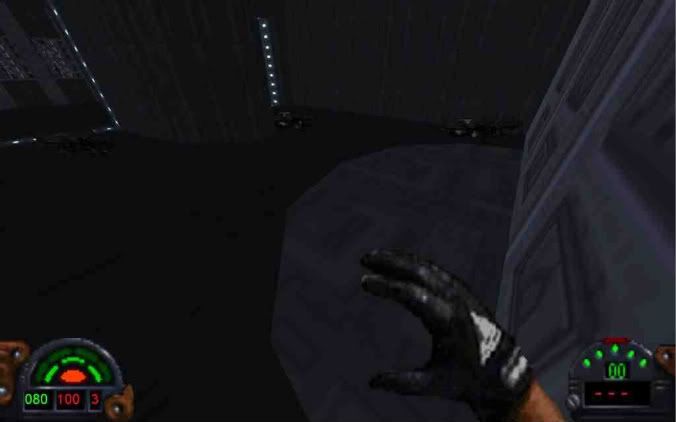
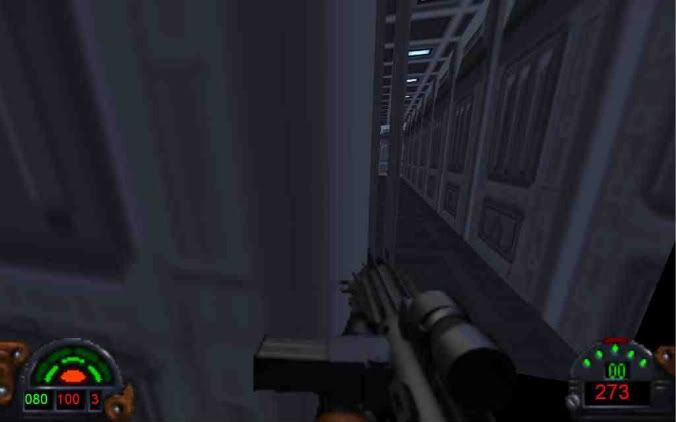
Also, I got stuck on the rotating door, but not the way you mentioned it earlier . . . I was standing near the side of the door, nudged it and it rotated. When it got done, I was right in the spot where there is a tiny gap between the door and the wall. I couldn't move. Also, the wall behind me disappeared when I turned directly towards it. Here's 2 screenshots:
|
|
|