| Author |
Message |
lucius
DarkXL Developer

Joined: 17 Feb 2008
|
|
Magic_Al
Gamorrean
Joined: 22 Mar 2005
|
 Posted: Jun 09, 2008 23:13 Post subject: Posted: Jun 09, 2008 23:13 Post subject: |
   |
|
It would be even better if DarkXL could be as resolution-independent as possible, so modders could drop in bitmaps of any resolution (perhaps within specified multiples of the substituted element's dimensions) and the engine would know what size to scale it to. Maybe it could even support additional graphics formats like PNG so modders don't have to mess with DF formats -- there could be a folder where TEXTCRAW.PNG would be detected and auto-magically load instead of TEXTCRAW.DLT for example. What I'm thinking about is what if it not only supported Mac/DOS data equally but also if it would allow for up-rezing mods, while hopefully not breaking custom elements from add-on levels.
_________________
----- MagicAl`s DARK FORCES Niche -----
http://wayback.archive.org/web/*/http://homepage.mac.com/anewmanagn/magic_al/
Armed only with a blaster pistol and an intimate knowledge of
Imperial methods, MagicAl prepares to go to lunch.... |
|
sheepandshepherd
Trandoshan
Joined: 01 Apr 2008
|
| Posted: Jun 10, 2008 01:58 Post subject: |
|
|
hmmm . . . KOTOR has an "override" folder where any kind of textures, models, etc. could be dropped and they would automatically override the default stuff in the compressed game files. Also, anything new dropped in the override folder would be loaded normally as well. Maybe you could include one of those in the DarkXL directory.
Only problem I see with that is how we get different file formats to override the default DF ones . . . maybe you could include a text file in this "override" folder with a format similar to this for non-standard overrides:
| Code: | override.txt
[original file] > [new file] *[optional scale factor]
blah.dlt > blah.png
asdf.3do > ghjkl.3do
oldwall.bm > newwall.bmp *0.5
... |
That way, if for some reason a replacement file didn't have the same name, format, or scale, this "override file" could fix that problem.
Files that did have the same specs, however, wouldn't have to be named in the text file, they would just be read by the DarkXL engine and loaded in place of the originals.
|
|
Magic_Al
Gamorrean
Joined: 22 Mar 2005
|
| Posted: Jun 10, 2008 05:12 Post subject: |
|
|
Oooo... widescreen! There are commercial games that inexplicably can't do this! (*cough* KOTOR! *cough*)


_________________
----- MagicAl`s DARK FORCES Niche -----
http://wayback.archive.org/web/*/http://homepage.mac.com/anewmanagn/magic_al/
Armed only with a blaster pistol and an intimate knowledge of
Imperial methods, MagicAl prepares to go to lunch.... |
|
Jimmy Chicken
Gamorrean
Joined: 09 Dec 2003
|
| Posted: Jun 10, 2008 18:06 Post subject: |
|
|
I'm not sure if this bug has been mentioned yet or not, but I'm running darkxl Demo1_b7f, the latest public build, and I think I found a problem with the "mission complete" triggers.
If you DON'T grab the death star plans and head to the roof FIRST, you'll hear kyle's voice over say, "this is too easy, now to get to my ship," except he says it with sortof an echo to his voice. You also don't get the "mission complete" message because you don't have the plans. But when you go back down the elevator and get the ds plans, after about a few seconds you get mission complete message.
I think there's just a mix-up in how the mission goals are being processed. DarkXL must be playing kyle's 'death star plans pick-up' voice message if you go to the roof first because you've completed it as your first objective, when really there is no order in which you have to do your objectives.
_________________
"if you see a wall with the blast marks DF 21 shot into it, I was there" |
|
lucius
DarkXL Developer
Joined: 17 Feb 2008
|
| Posted: Jun 10, 2008 18:11 Post subject: |
 |
|
Jimmy Chicken wrote:
I'm not sure if this bug has been mentioned yet or not, but I'm running darkxl Demo1_b7f, the latest public build, and I think I found a problem with the "mission complete" triggers.
If you DON'T grab the death star plans and head to the roof FIRST, you'll hear kyle's voice over say, "this is too easy, now to get to my ship," except he says it with sortof an echo to his voice. You also don't get the "mission complete" message because you don't have the plans. But when you go back down the elevator and get the ds plans, after about a few seconds you get mission complete message.
I think there's just a mix-up in how the mission goals are being processed. DarkXL must be playing kyle's 'death star plans pick-up' voice message if you go to the roof first because you've completed it as your first objective, when really there is no order in which you have to do your objectives.
This is a know issue, but thanks for bringing it up just in case.  The INF system is going through some revisions for the next build to support all the features needed for Talay (done) and the Sewers level (in progress). So this will likely be addressed in that build. The INF system is going through some revisions for the next build to support all the features needed for Talay (done) and the Sewers level (in progress). So this will likely be addressed in that build.
_________________
DarkXL....http://darkxl.wordpress.com |
|
Magic_Al
Gamorrean
Joined: 22 Mar 2005
|
| Posted: Jun 10, 2008 19:03 Post subject: |
|
|
What's the download link to the latest public build? I have the one from the darkxl site's download page. Kyle can't open doors.
_________________
----- MagicAl`s DARK FORCES Niche -----
http://wayback.archive.org/web/*/http://homepage.mac.com/anewmanagn/magic_al/
Armed only with a blaster pistol and an intimate knowledge of
Imperial methods, MagicAl prepares to go to lunch.... |
|
lucius
DarkXL Developer
Joined: 17 Feb 2008
|
| Posted: Jun 10, 2008 19:14 Post subject: |
|
|
Magic_Al wrote:
What's the download link to the latest public build? I have the one from the darkxl site's download page. Kyle can't open doors.
The latest is build 7f. Kyle has been able to open doors in every build, are you sure you've got the button mapped properly? It defaults to the right mouse button I think, but you can remap it if needed. Try it on a different key in case that is an issue.
Also, do the bars raise when you first land in the elevator shaft? If not then maybe it can't find the INF file for the level (SECBASE.INF).
As for the build, there is a link on the first page of this topic in the first post. Also the build on the website should also be the most recent one.
_________________
DarkXL....http://darkxl.wordpress.com |
|
Gez
Gamorrean
Joined: 05 May 2008
|
| Posted: Jun 10, 2008 22:21 Post subject: |
|
|
Speaking of button mapping and the next build, will it be the one were we'll able to use all of the mouse buttons rather than just left and right?
I'm used to the following setup in ZDoom, so I'd like to use it in DXL too.
mouse1=+attack
mouse2=+jump
mouse4=+use
mouse5=+altattack
mwheelup=weapnext
mwheeldown=weapprev
|
|
lucius
DarkXL Developer
Joined: 17 Feb 2008
|
| Posted: Jun 10, 2008 22:45 Post subject: |
|
|
Gez wrote:
Speaking of button mapping and the next build, will it be the one were we'll able to use all of the mouse buttons rather than just left and right?
I'm used to the following setup in ZDoom, so I'd like to use it in DXL too.
mouse1=+attack
mouse2=+jump
mouse4=+use
mouse5=+altattack
mwheelup=weapnext
mwheeldown=weapprev
The currently manually edited text file for settings is going away for the next build, so I should just be able to read the current keyboard/mouse button being hit when setting up the controls and use that value. In other words, all the keys that windows supports should work. Although I won't be doing gamepad support yet.
_________________
DarkXL....http://darkxl.wordpress.com |
|
Magic_Al
Gamorrean
Joined: 22 Mar 2005
|
| Posted: Jun 11, 2008 00:21 Post subject: |
|
|
lucius wrote:
Magic_Al wrote:
What's the download link to the latest public build? I have the one from the darkxl site's download page. Kyle can't open doors.
The latest is build 7f. Kyle has been able to open doors in every build, are you sure you've got the button mapped properly? It defaults to the right mouse button I think, but you can remap it if needed. Try it on a different key in case that is an issue.
Also, do the bars raise when you first land in the elevator shaft? If not then maybe it can't find the INF file for the level (SECBASE.INF).
As for the build, there is a link on the first page of this topic in the first post. Also the build on the website should also be the most recent one.
It's all working now. I didn't see "nudge" in the txt file before and I never tried right-click because subconsciously I was back in the 1990s when the Mac had a single-button mouse.
Is it possible to map the Caps Lock key? In the Mac version caps lock was the default mapping for slow, and then the run key would do regular walk speed as long as slow was down (IIRC).
_________________
----- MagicAl`s DARK FORCES Niche -----
http://wayback.archive.org/web/*/http://homepage.mac.com/anewmanagn/magic_al/
Armed only with a blaster pistol and an intimate knowledge of
Imperial methods, MagicAl prepares to go to lunch.... |
|
lucius
DarkXL Developer
Joined: 17 Feb 2008
|
|
Gez
Gamorrean
Joined: 05 May 2008
|
|
Kamikave
Dianoga
Joined: 19 Jun 2008
|
| Posted: Jun 19, 2008 20:47 Post subject: |
|
|
Hello
I tried DarkXL with the french version of Dark Forces, and it worked well, including the briefing in french. I only got this (from the 'DXL_Log.rtf')
<Game::LoadMap 97> Loading Map: SECBASE.LEV
<GOB_Reader::OpenFile 71> Failed to load ZWIMP10L.BM from "D:/DarkF/TEXTURES.GOB"
<GOB_Reader::OpenFile 71> Failed to load ZWIMP11.BM from "D:/DarkF/TEXTURES.GOB"
<Game::LoadMap 100> Map loaded successfully.
I don't know what it means though.
Also, the ennemies keep talking after their death ("Set blasters to maximum" and stuff like that) when you kill them as soon as you see them.
Good luck for the next build, I look forward to it !
You're doing a great job 
|
|
lucius
DarkXL Developer
Joined: 17 Feb 2008
|
| Posted: Jun 19, 2008 21:10 Post subject: |
|
|
Kamikave wrote:
Hello
I tried DarkXL with the french version of Dark Forces, and it worked well, including the briefing in french. I only got this (from the 'DXL_Log.rtf')
<Game::LoadMap 97> Loading Map: SECBASE.LEV
<GOB_Reader::OpenFile 71> Failed to load ZWIMP10L.BM from "D:/DarkF/TEXTURES.GOB"
<GOB_Reader::OpenFile 71> Failed to load ZWIMP11.BM from "D:/DarkF/TEXTURES.GOB"
<Game::LoadMap 100> Map loaded successfully.
I don't know what it means though.
Also, the ennemies keep talking after their death ("Set blasters to maximum" and stuff like that) when you kill them as soon as you see them.
Good luck for the next build, I look forward to it !
You're doing a great job
Those files have never loaded. They are referenced textures that don't actually exist. I suspect they are referenced from dummy sectors so the problem isn't noticable. The actual game does include occasional bugs, some of which are replicated faithfully.  Data type bugs, such as misaligned textures, texture errors (a sector has the wrong sky texture in Talay, for example, but its generally not noticable unless you look straight up in that sector), referencing missing textures, etc. are not really fixable except by modding the data. However these bugs aren't a big deal, most people play through Dark Forces just fine without noticing many issues. Data type bugs, such as misaligned textures, texture errors (a sector has the wrong sky texture in Talay, for example, but its generally not noticable unless you look straight up in that sector), referencing missing textures, etc. are not really fixable except by modding the data. However these bugs aren't a big deal, most people play through Dark Forces just fine without noticing many issues.
As for Stormtroopers talking after they die - if you kill them quick enough - this also happened in the actual game. Basically once the sound file starts playing, it is allowed to finish even if the enemy that started it has died.
Anyway, thanks for testing! I'm glad it worked well for you. Can you post your system specs so I can keep track of what hardware DarkXL has been tested with?
_________________
DarkXL....http://darkxl.wordpress.com |
|
Kamikave
Dianoga
Joined: 19 Jun 2008
|
| Posted: Jun 19, 2008 22:20 Post subject: |
|
|
Yes, sorry, I forgot that part ^^'
motherboard : Asus Crosshair
CPU : AMD 64 X2 5000+ Dual Core
RAM : 2 Go
VIDEO : Nvidia GeForce 8600 GTS 256 Mo (drivers version 169.21) using 1680 x 1050 (16:10)
Sound : Creative Audigy SE
OS : Windows XP SP2
|
|
lucius
DarkXL Developer
Joined: 17 Feb 2008
|
|
CDBlackmage
Dianoga
Joined: 20 Jun 2008
|
| Posted: Jun 20, 2008 07:45 Post subject: I just played it! |
|
|
Quote:
A) Did you make it through? You should get the mission complete text at the top of the screen.
Yes, I made it through; I didn't go into the secret area, though.
Quote:
B) How well did it ran and system specs. The engine is far from optimized, so this will get alot better. A rough guess is fine (smooth, slow, whatever).
Specs are the following:
CPU: Pentium 4 D 2.8 GHz
RAM: 3GB RAM
GPU: GeForce 8800GT
SOUND: SigmaTel HD Audio (mobo-integrated, woo.)
OS: WinXP Pro SP2
It seemed to run just fine.
Quote:
C) How did it feel? Does it feel like Dark Forces, and if not why?
It feels better than ever, thanks to the mouse having support for look up/down.
Quote:
D) Any bugs not mentioned or any comments.
In terms of bugs, nothing to report (I'll probably give it another go-around and will post if I find anything); I just had the known issues to work with.
I just happened to find this place when looking on ideas to get Dark Forces to run on WinXP (I had a craving to play it after having the disc sit and do nothing for several years!). I absolutely LOVE what's already been done, and I can't wait to see more. I only wish I was proficient in programming to help this along. 
|
|
Taton
Trandoshan
Joined: 25 Sep 2003
|
| Posted: Jun 22, 2008 18:47 Post subject: |
|
|
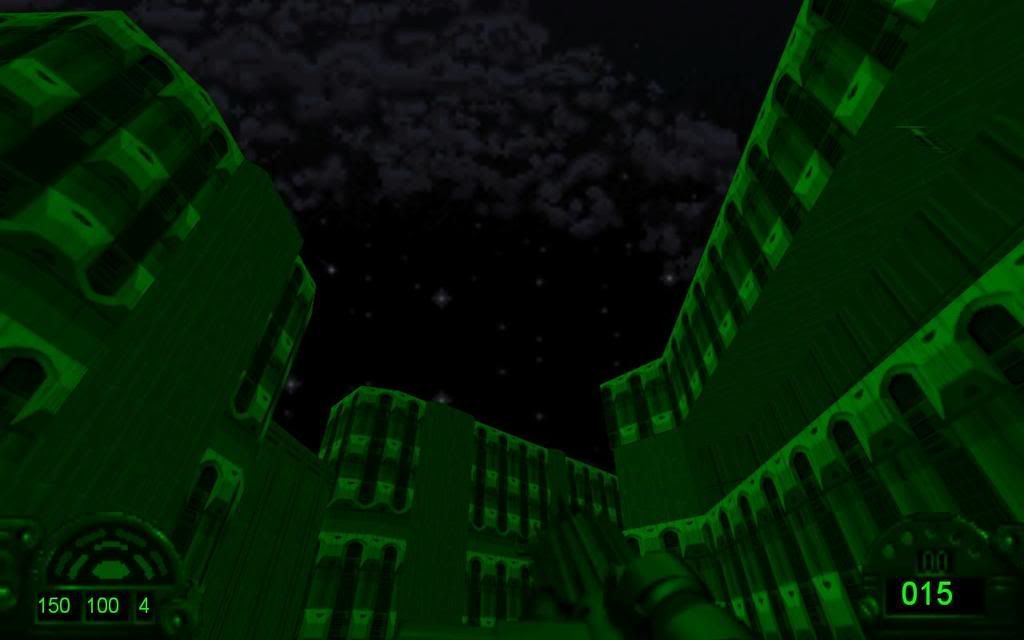
Found and interesting bug. I didn't see it on the bug list, apologies if someone already posted it.
When you use the IR goggles, everything turns green, except for the sky.
System specs:
CPU: Pentium 4 3.0GHz
RAM: 512 MB
GPU: Mobility Radeon 9700
Sound: SigmaTel C-Major Audio (Im pretty sure its onboard)
_________________
"A fight should be clean and elegant, without waste"
-Asuka Langley Sohryu, Evangelion |
|
sheepandshepherd
Trandoshan
Joined: 01 Apr 2008
|
| Posted: Jun 22, 2008 19:04 Post subject: |
|
|
Yeah, I noticed that too . . . here's a screenshot of what Taton found:
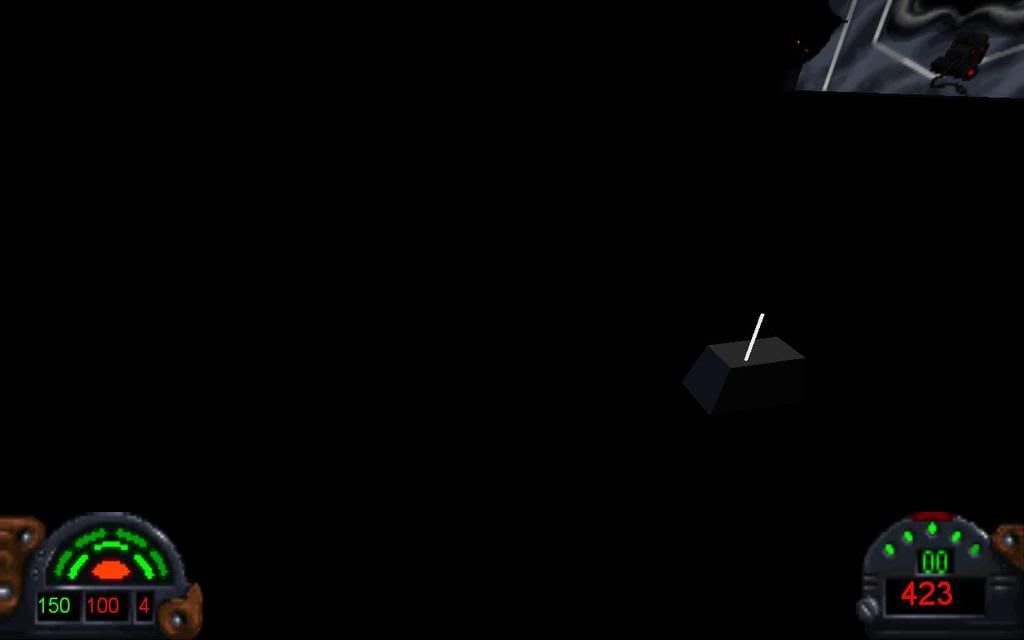
Also, in the room with the non-functional interrogators, there is a mousebot (or it got in through the door), and the lighting on it is wrong. If I remember right, DF didn't do lighting on 3dos because of a limitation in the engine, but I think this would be a good thing to add in DarkXL to prevent this:
|
|
klasodeth
Trandoshan
Joined: 03 Mar 2008
|
| Posted: Jun 22, 2008 19:15 Post subject: |
|
|
That lighting issue on the mouse droid is probably part of a known lighting issue that affects several walls. In fact, it's visible in that last screenshot, where the wall depicting the emperor is much too bright. There are a lot of walls where that happens, but the lighting tends to be bright enough that the problem isn't too obvious.
|
|
sheepandshepherd
Trandoshan
Joined: 01 Apr 2008
|
| Posted: Jun 22, 2008 19:33 Post subject: |
|
|
Shouldn't the mouse be a lot darker? It's in a really dark room 
|
|
klasodeth
Trandoshan
Joined: 03 Mar 2008
|
| Posted: Jun 22, 2008 20:00 Post subject: |
|
|
sheepandshepherd wrote:
Shouldn't the mouse be a lot darker? It's in a really dark room
Yes, and so should that really bright wall in the background. I was just saying that I think they're both suffering from the same problem.
|
|
sheepandshepherd
Trandoshan
Joined: 01 Apr 2008
|
| Posted: Jun 22, 2008 20:29 Post subject: |
|
|
Yeah, sorry, you're right, I just checked it in Dosbox 
|
|
Weregoose
Gamorrean
Joined: 05 May 2008
|
| Posted: Jun 23, 2008 03:26 Post subject: |
|
|
Unity wrote:
I slide a little bit along after I release the walk-button, feels almost like skating. Almost convinced that wasn't a problem in the original.
lucius wrote:
As for the movement speed - it should be correct, the original is also moves fast compared to other games such as Doom. The movement acceleration is also in the original Dark Forces, as someone once said the character controls like a boat
I wanted to address this before the subject was too far gone. When the time comes to implement it, something to keep in the back of your mind possibly is the fact that wearing Ice Cleats actually halves deceleration. I've gone so far as to measure this out with different movement rates; I found out, in fact, that the time required to come to a full stop is the same between running and walking slowly, and then even water and sewage don't have any impact (as long as it doesn't have any current).
I don't know what ice does, but the Ice Cleats normalize movement on top of it (yet still with half-deceleration). Jumping and crouching are also significant factors, but I don't want to run any more numbers tonight, plus I'm sure that you've got some more understanding behind all this. Lastly, though, and only so that I don't have to pipe up about this at a later date, the mid-air acceleration, if kept, might be better suited for the extended mode. It would have allowed for some pretty tricky jumps in the original.
That is all.
|
|
Marley
Gamorrean
Joined: 30 Sep 2003
|
| Posted: Jun 26, 2008 17:04 Post subject: |
|
|
This may have been addressed...
As we know when you release the direction key Kyle keeps moving in the direction he was travelling and then stops. This works in DarkXL except when pressing two directions at once.
If your strafing and moving forward and you stop you keep moving in the direction you were strafing but do not keep moving forward forward. This is making the controls feel jerky and unreal. In the original Dark Forces if you are strafing and moving forward and you release you keep travelling in in both directions, i.e diagonally.
_________________
*ZaP* |
|
The MAZZTer
Death Star

Joined: 25 Sep 2003
|
| Posted: Jun 26, 2008 22:13 Post subject: |
|
|
That's called inertia, class! 
_________________
http://www.mzzt.net/ | I am a respectable admin with a respectable sig. |
|
lucius
DarkXL Developer
Joined: 17 Feb 2008
|
| Posted: Aug 06, 2008 21:06 Post subject: |
|
|
If anyone is wondering, I made this a sticky so new people can easily see that there is a demo available. When the new release hits, this will become a normal topic again and the new release thread will take its place.
_________________
DarkXL....http://darkxl.wordpress.com |
|
linny129
Dianoga
Joined: 10 Feb 2005
|
| Posted: Aug 09, 2008 21:45 Post subject: |
|
|
Wow truely impressed. I haven't visted the DF-21 site in some time, imagine my surprise when I saw this! I have been waiting forever for someone to make a hardware accelerated port, and you are off to a great start. I look forward to seeing further releases.
|
|
lucius
DarkXL Developer
Joined: 17 Feb 2008
|
|
|