| Author |
Message |
lucius
DarkXL Developer

Joined: 17 Feb 2008
|
 Posted: Apr 28, 2008 09:33 Post subject: DarkXL Update 5 - Alpha Demo 1 Release! Posted: Apr 28, 2008 09:33 Post subject: DarkXL Update 5 - Alpha Demo 1 Release! |
    |
|
Ok, it's time for the first Alpha Demo! Before downloads begin however I'd like to talk about a few things first.
This demo only works with the full ***RETAIL*** version of Dark Forces.
Make sure that when installing Dark Forces, it is a complete install with all data files on the hard drive, otherwise the game will not startup.
KNOWN ISSUES
I intentionally left out some features, so here are some known issues or features not yet implemented:
-Previously mentioned: no map, inventory, VUEs, midi-music or menus.
-Other features missing: Interrogation Droid AI, Fixed Function rendering (pixel shader 1.1 or better required), mouse look is forced on - you cannot use keys to turn, sprites look too flat when viewed at too steep an angle, difficulty, text displays, DF font.
-Other dynamics that will be improved in coming versions: INF - elevators and some doors move too slow. AI - the AI isn't complete yet, it does shoot at players and move though.
INSTRUCTIONS
When you download the zip file, put it in any directory you like. Then open up DXL_Settings.txt and set the correct Dark Forces directory for "DForces" If the game runs too slow try lowering "TexFilter" If you wish to change key bindings you can, the entire key list is listed in the lower part of the file so you don't have to guess at the names. This file will be replaced by menus in a future version of the alpha demo.
If you don't have OpenAL installed you'll need to get and install that, link is at the bottom.
Also you may need to update DirectX, follow the DirectX WebInstaller link at the bottom to do so.
DEFAULT CONTROLS
Mouse to turn.
Forward: 'W'
Back: 'S'
StrafeLeft: 'A'
StrafeRight: 'D'
Slow: 'Alt'
Run: 'Shift'
Crouch: 'Ctrl'
Nudge: 'Right Mouse'
Jump: 'Space Bar'
Shoot: 'Left Mouse'
MISSION
I would like everyone who can to play through the level and let me know:
A) Did you make it through? You should get the mission complete text at the top of the screen.
B) How well did it ran and system specs. The engine is far from optimized, so this will get alot better. A rough guess is fine (smooth, slow, whatever).
C) How did it feel? Does it feel like Dark Forces, and if not why?
D) Any bugs not mentioned or any comments.
Please! Even if you think it's perfect (yeah right), atleast let me know if it works for you!
****UPDATED VERSION, Build: 7f****
The Alpha Demo:
http://www.darkxl.df-21.net/Builds/DarkXL_AlphaDemo1_b7f.zip
OpenAL if you need it:
http://developer.creative.com/articles/article.asp?cat=1&sbcat=31&top=38&aid=46&file=oalinst.exe
DirectX WebInstaller, download if any D3DX dll's are missing or if DirectX is out of date:
DirectX Web Installer
_________________
DarkXL....http://darkxl.wordpress.com
Last edited by lucius on Aug 18, 2008 03:50; edited 19 times in total |
|
lucius
DarkXL Developer
Joined: 17 Feb 2008
|
|
BlazingPhoenix
Ree-Yees
Joined: 22 Mar 2008
|
| Posted: Apr 28, 2008 10:04 Post subject: |
|
|
Woot! Time to try this thing out. 
EDIT: What's up with the enemies in this pic?

|
|
Fenwar
Admiral Ackbar

Joined: 15 Sep 2003
|
| Posted: Apr 28, 2008 12:05 Post subject: |
|
|
Looks like an Ewok punching a Jawa to me.
(...you don't remember that bit of secbase?  ) )
Seriously looking forward to trying this out later.
|
|
bak1977
Dianoga
Joined: 28 Apr 2008
|
| Posted: Apr 28, 2008 12:35 Post subject: |
|
|
Thanks for this Alpha. Very fine project. Here my answers:
A)i made it through the mission without any problems
B)i think it runs a little bit too fast on my pc (E6750, 8800gt)
C)it feels very good, bit too fast as mentioned
D)alternative to invert the mouse would be nice
go on with this fine project and may the force be with you
|
|
BlazingPhoenix
Ree-Yees
Joined: 22 Mar 2008
|
| Posted: Apr 28, 2008 13:49 Post subject: |
|
|
Would you like an alternate download while I'm at it? 
|
|
The MAZZTer
Death Star

Joined: 25 Sep 2003
|
| Posted: Apr 28, 2008 15:17 Post subject: |
|
|
Here's my bug list/suggestions:
- Allow for inverted mouse look.
- Fullscreen window should minimize when it loses focus (IE when the user task switches away or presses the WIN key).
- settings.txt should allow for the binding of mouse buttons other than just left and right (my mouse has five buttons) and the mouse wheel.
- You could make Settings.txt's syntax a bit more standard by using an INI syntax or an XML-type syntax. I find XML works well for me in my programs (but then again I use .NET which has an integrated XML parser so...)
- Allow for adjusting mouse sensitivity in Settings.txt
- What's PosX and PosY? The window's position on the desktop? That's really not too important, just pass Windows values of -1 for each to center it on the desktop (IIRC).
- Allow the player to move forward/backward while strafing (I bound movement to the arrow keys if this is a bug).
- Display weapon keys in settings.txt
- Add keys in settings.txt for next/prev weapon (bind to mouse wheel by default )
- Enemies attempt to shoot at you without line of sight if they are ina sector directly above yours. I was down ithe first corridor and to the left, when the enemy was a previously-alerted stormie on the ledge to the left of the start.
- Stormtroopers use the incorrect "death" animation. I think.
- Kyle punches too fast.
- You can't kill mousedroids.
- Mousedroids should not collide with the player.
- There is clipping errors with the secret door that moves the two walls and the floor/ceiling to open.
- I can't collect the shields in that area, oddly.
- No font for the ammo/health/shields but you already knew that.
- Interrogator droids have no logic.
- Sometimes Kyle gets "hung up" on sector edges. Sometimes related to elevators, but not always.
- No crow?
 - Stormtroopers should take 2 shots minimum instead of 3.
- Occasionally shots will pass straight through enemies. It might have something to do with shots passing through multiple sectors on their way or through sectors with varying floor heights.
- Shots collide with the floor farther out than they should... try to shoot the guy by the beginning from the vent.
- Also, Kyle falls off ledges too early, making timing for jumps off. Edge out on the vent's ledge in both Dark Forces and DarkXL to see what I mean.
- KEY_ALT only captures Left ALT, but ignores Right ALT.
_________________
http://www.mzzt.net/ | I am a respectable admin with a respectable sig. |
|
CoinCollector
Dianoga
Joined: 10 Nov 2007
|
| Posted: Apr 28, 2008 17:01 Post subject: |
|
|
I tried it, and it's great! Everything I was going to say was already said by The_Mega_ZZTer.
|
|
lucius
DarkXL Developer
Joined: 17 Feb 2008
|
| Posted: Apr 28, 2008 19:17 Post subject: |
|
|
Blazing Pheonix, can you tell me your system specs. The rendering seems really strange to me. What GPU are you using? What resolution (if it's not the default)? Are you using recent video card drivers? Vista or XP?
It looks you may have modified the resolution to match your desktop but somehow it's too big? If you want a fullscreen experience then just set FullScreen to 1 in the settings file. If you do that, does that help?
_________________
DarkXL....http://darkxl.wordpress.com |
|
lucius
DarkXL Developer
Joined: 17 Feb 2008
|
| Posted: Apr 28, 2008 19:32 Post subject: |
|
|
The_Mega_ZZTer:
Just wanted to mention that there is no crow because VUE functionality is not implemented yet which I did mention before This will appear before the next major version. As for the settings file, it's only temporary until I get menus working.
So can I assume that you finished the level successfully (by the Crow comment)? Did it run well for you and can you give me some information about your system? I'd like to know what hardware it works on now and how well.
And finally, you mentioned a list of bugs/suggestions - thank you by the way it's exactly the kind of information that I need - you didn't tell me what you thought of the program as a whole...
_________________
DarkXL....http://darkxl.wordpress.com |
|
klasodeth
Trandoshan
Joined: 03 Mar 2008
|
| Posted: Apr 28, 2008 20:05 Post subject: |
|
|
Tested on:
Dell Inspiron E1705 w/ GeForce 7900 chipset, 4GB RAM, running Windows Vista.
No-name desktop system w/ GeForce 6800 chipset, 1GB RAM, running Windows XP.
----------------------------------------
Bugs experienced that have not yet been listed in this thread:
On both systems I tried going outside to the Crow rendezvous point before picking up the plans, and as soon as I stepped outside the voice file that plays when Kyle collects the Death Star Plans played. It had an echo quality to it as if it was playing the same sound twice at a slight offset. I think the echo might be caused by it playing the voice file in place of the item pickup sound effect that plays if I collect the plans before going outside. It still displayed the Mission Complete message at the correct time (when both objectives are completed), and if I collect the plans before going outside everything works fine.
It appears that blaster projectiles spawn at the end of the firing animation instead of at the beginning. It's particularly noticeable with the Bryar pistol.
the Stormtrooper rifle should be using its own shoot and empty sound, instead of recycling the pistol sounds.
When weapon switching, the old weapon should pull to the bottom of the screen, and the new one should rise into position from the bottom of the screen. Right now it's an instant change.
Oddly enough, on my notebook running Vista the battery power won't drain when running the headlamp, but it works properly on my desktop running XP.
----------------------------------------
A) Did you make it through?
--I was able to complete the mission, on two computers so far. I'll try it later on a few more systems.
B) How well did it ran and system specs. The engine is far from optimized, so this will get alot better. A rough guess is fine (smooth, slow, whatever).
--It ran very smooth on both machines I used to test DarkXL. No slowdown whatsoever.
C) How did it feel? Does it feel like Dark Forces, and if not why?
--The levels and effects look and sound great. While of course bugs and missing features are noticeable, overall it really feels like it's on its way to being a faithful emulation of Dark Forces. There's always the risk with this kind of project that the gameplay, particularly gameplay physics, might feel as if they were stripped from a different game. But I'd say you've done a very good job avoiding that effect.
D) Any bugs not mentioned or any comments.
Keep up the good work! I'm already eagerly anticipating the ability to kill Stormtroopers at Talay.
|
|
Tsophika
Gamorrean
Joined: 14 Jan 2008
|
| Posted: Apr 28, 2008 21:06 Post subject: |
|
|
I've played through it several times without issues. I'm running an Intel QX6700, 8800GTX, 2GB RAM and Vista.
The most noticable issues to me involve the AI. Enemies seem to move very fast, and they tend to charge close to the player. Even outside the base, shooting up at the second level, they tend to cluster right on the edge. Their awareness seems a bit off too; as you step out of the opening vent, the troopers above and left are quick to notice you, while the three down the hall don't become aware until I'm nearly to the door. Outside, the two troopers guarding the door seem to have an issue where the sprite flips back and forth very fast, as if they can't decide which direction to go. I can shoot through many troopers without hitting them, especially the closer I get. The fists seems to have a range of about four feet.
Second to that is the inability to strafe while moving forward or back. It was a little frustrating to find myself getting hung up a lot because of this.
So far a lot looks and feels great! DarkXL opens and closes instantly and performance is perfectly smooth. Perhaps in the future you could include a frame counter? I never thought I'd be playing Dark Forces at 1920X1200!
|
|
sheepandshepherd
Trandoshan
Joined: 01 Apr 2008
|
| Posted: Apr 28, 2008 23:01 Post subject: |
|
|
Here we go:
A) Yep, made it through.
B) It ran pretty fast, especially the bullets. Seemed like I had just picked up 3 or 4 weapon supercharges  Other than that, no performance issues for me, it ran smoothly . . . I don't know my exact system specs, but I have an Alienware, 2 GB memory, a pretty good video card . . . probably why it was too fast. You should add an option to change the game speed when you get the time, that seems to be a problem for some people. Other than that, no performance issues for me, it ran smoothly . . . I don't know my exact system specs, but I have an Alienware, 2 GB memory, a pretty good video card . . . probably why it was too fast. You should add an option to change the game speed when you get the time, that seems to be a problem for some people.
C) Besides the speed, it feels pretty Dark Forces-ish. Although the mouse look makes it feel a little more like Jedi Knight . . . but that's fine with me, I like mouse look.
D) The bugs:
-The bullets, like I mentioned . . . even though my game was sped up overall, the bullets were even faster than everything else.
-Some animation problems - the death animations were too slow, and I saw that same "twitching" problem Tsophika mentioned with stormtrooper sprites flipping back and forth rapidly. Also, the extra life sprite animates really slowly.
-Running seems to prevent jumping, strafing, and crouching, which made me rethink my strategies.
-No auto aim - that's good. We don't want it with mouse look. That would be too easy. However, I would like a crosshair - my high resolution makes it hard to aim.
-I got hung up a few times, but it wasn't on the walls, it was on the invisible sector portals, especially in the stairs leading down to the floor with the Death Star plans.
-The AI got hung up on the walls A LOT.
-Also, Stormtroopers disappeared when they were directly behind a corner, but they could still shoot me. That's probably hard to prevent when using sprites . . .
-No sound? Did I forget to do something? Is it my computer?
-The keys for headlight, headwave, IR goggles, etc.?
-At the very beginning, the first brown Imp Officer - I looked up at him on the "platform" thingy and (due to the fast mouse movement) shot about 3 feet above him, but still killed him.
-In the room with the red key, the elevators are fine when I go up, but they shake and stutter when I go down. I've actually had this problem in DF before, but only with the very first elevator in Barry Brien's Secret Base remake.
-I can't kill the annoying mouse bots! I always kill the mouse bots!!!  By the way, in the game, do mouse bots alert nearby troops when they see you, or are they just there as decoration (as in useless pests)? By the way, in the game, do mouse bots alert nearby troops when they see you, or are they just there as decoration (as in useless pests)?
-Right before the room with the Death Star 3DO, there is a secret area that opens up when you go up the elevator on top of it. Before I went up the elevator, I shot a stormtrooper in that room and he was knocked back through the gap. That shouldn't have been possible. Here's a screenshot of the area I'm talking about. The red arrow is where the stormtrooper went when I shot him . . . I think this is a problem with the height collision of the AI, like the Imp Officer I mentioned above.
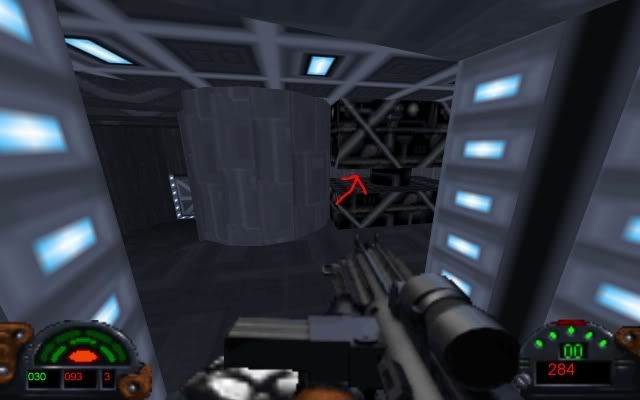
Also, notice that my computer is widescreen. Does the HUD look stretched to you? I can't tell, I haven't played darkXL on a normal screen. By the way, this screenshot is using the default resolution (1280x960), not my screen's resolution (1920x1200).
-Just a random question - I mentioned picking up multiple weapon supercharges. In DF, if you did this, would it make you shoot even faster than just 1 supercharge?
And awesome job, I've already played it like 10 times Keep up the good work!
Edit: This isn't a bug, or even a problem, but I just randomly noticed that the missile ammo counter says "00" and not "--" like in DF. I suggest you leave it like that, I found it annoying in DF to have to switch to the Assault Cannon to see how many missiles I had.
|
|
lucius
DarkXL Developer
Joined: 17 Feb 2008
|
| Posted: Apr 28, 2008 23:15 Post subject: |
|
|
Quote:
-No sound? Did I forget to do something? Is it my computer?
You should have sound, as far as I know everyone else has sound so far. Did you intall the OpenAL driver linked in my initial post?
Quote:
-The keys for headlight, headwave, IR goggles, etc.?
The key for the headlamp is F5 and the IR goggles is F2, like in the original. You cannot hurn off the headwave, hud or weapon right now.
Quote:
-I can't kill the annoying mouse bots! I always kill the mouse bots!!! By the way, in the game, do mouse bots alert nearby troops when they see you, or are they just there as decoration (as in useless pests)?
I didn't implement death in the mousebot logic yet, I'll do that soon. In DF they are just decorations as far as I can tell.
Quote:
Also, notice that my computer is widescreen. Does the HUD look stretched to you? I can't tell, I haven't played darkXL on a normal screen. By the way, this screenshot is using the default resolution (1280x960), not my screen's resolution (1920x1200).
Yes the HUD looks stretched, I can tell because the text isn't centered correctly. I'll have to fix that.
As for the AI, as I mentioned before it still needs some work. This will be happening soon.
And I think I know what the speed problem might be... I'll get that fixed
_________________
DarkXL....http://darkxl.wordpress.com
Last edited by lucius on Apr 28, 2008 23:22; edited 2 times in total |
|
lucius
DarkXL Developer
Joined: 17 Feb 2008
|
| Posted: Apr 28, 2008 23:18 Post subject: |
|
|
Thanks everyone for responding and talking about the issues you've had.
For everyone else, even if you don't have any new issues to add please post - you guys are the only way I have of testing this thing on multiple computers and GPU's
_________________
DarkXL....http://darkxl.wordpress.com |
|
Ryuichi91
Ree-Yees
Joined: 06 Aug 2007
|
| Posted: Apr 28, 2008 23:30 Post subject: |
|
|
Hey I just finished testing and I thought you did an excellent job. I had the same problems as the others but just to add to the list of Computers and GPUs. My computer is a Gateway Laptop with GeForce 6100 Go chipset with 1 GB of Ram, AMD Turion 64 CPU, running Windows Vista
|
|
sheepandshepherd
Trandoshan
Joined: 01 Apr 2008
|
| Posted: Apr 29, 2008 00:04 Post subject: |
|
|
Yeah, I installed OpenAL . . . it created a folder in C:\Program Files\OpenAL\, but the only thing in it is a copy of the installer. Is there anything else I should have done to get it working?
And one reminder about the AI before you finish it - in DF, the AI would come looking for you if they heard or saw a gunshot, and they don't do that yet in DarkXL. Don't forget to add that in so they'll have a bit of common sense . . . We wouldn't want them to end up like the stormtroopers in Jedi Outcast . . . "What was that? Probably nothing. I can't see a thing in this helmet."
|
|
lucius
DarkXL Developer
Joined: 17 Feb 2008
|
|
bak1977
Dianoga
Joined: 28 Apr 2008
|
| Posted: Apr 29, 2008 00:22 Post subject: |
|
|
I also have no sound (i thought it isnt implemented yet). But now i installed Open AL an there is still no sound. I have Realtek HD Audio.
|
|
lucius
DarkXL Developer
Joined: 17 Feb 2008
|
| Posted: Apr 29, 2008 00:36 Post subject: |
|
|
As for sound:
sheepandshepherd - do you also have Realtek HD Audio? If not which sound chipset do you have?
I've found some potential compatibility issues with Realtek, I'll be looking into it more later.
_________________
DarkXL....http://darkxl.wordpress.com |
|
sheepandshepherd
Trandoshan
Joined: 01 Apr 2008
|
|
sheepandshepherd
Trandoshan
Joined: 01 Apr 2008
|
| Posted: Apr 29, 2008 00:46 Post subject: |
|
|
As for the AI detection . . . when I first started the level, without leaving the vent thingy, I shot repeatedly at the wall to my left, where the commando was standing, and he didn't notice. Also, in DF, when you shoot from the vent to the door straight ahead, the officers and stormtroopers notice, and they didn't in DarkXL.
|
|
lucius
DarkXL Developer
Joined: 17 Feb 2008
|
|
lucius
DarkXL Developer
Joined: 17 Feb 2008
|
| Posted: Apr 29, 2008 01:10 Post subject: |
|
|
sheepandshepherd wrote:
As for the AI detection . . . when I first started the level, without leaving the vent thingy, I shot repeatedly at the wall to my left, where the commando was standing, and he didn't notice. Also, in DF, when you shoot from the vent to the door straight ahead, the officers and stormtroopers notice, and they didn't in DarkXL.
Well then it's probably not working right I'll get it working when I tweak the AI, thanks for the information.
_________________
DarkXL....http://darkxl.wordpress.com |
|
Burning Gundam
Kell Dragon
Joined: 28 Sep 2003
|
| Posted: Apr 29, 2008 01:18 Post subject: |
|
|
Sweet! I'll give this a go when I switch over to XP a little later.
Also, it would be nice if widescreen would be supported, since I hear that it's stretched a bit. I just bought a widescreen monitor last month since my old 15 inch about died on me.
Expect my input a little later to see how it works on the XP on Mac end
_________________
I don't think outside the box... I customize it. |
|
BlazingPhoenix
Ree-Yees
Joined: 22 Mar 2008
|
|
sheepandshepherd
Trandoshan
Joined: 01 Apr 2008
|
| Posted: Apr 29, 2008 01:36 Post subject: |
|
|
Oooh, I found something! Any of you interested in rendering, try pressing F9 . . . or if you're just looking for a challenge, try playing the whole level this way
|
|
BlazingPhoenix
Ree-Yees
Joined: 22 Mar 2008
|
| Posted: Apr 29, 2008 01:42 Post subject: |
|
|
Woah, that's pretty insane. I just tried it out and it was really tough for me to move around. XD
|
|
lucius
DarkXL Developer
Joined: 17 Feb 2008
|
| Posted: Apr 29, 2008 02:55 Post subject: |
|
|
Blazing Pheonix: did running fullscreen help your rendering problem?
sheepandshepherd: oops, I forgot to take out the wireframe button...
_________________
DarkXL....http://darkxl.wordpress.com |
|
The MAZZTer
Death Star
Joined: 25 Sep 2003
|
| Posted: Apr 29, 2008 03:04 Post subject: |
|
|
You can check if you have OpenAL installed by looking for C:\Windows\system32\openal32.dll. It will be present in a proper install.
lucius wrote:
The_Mega_ZZTer:
Just wanted to mention that there is no crow because VUE functionality is not implemented yet which I did mention before This will appear before the next major version. As for the settings file, it's only temporary until I get menus working.
So can I assume that you finished the level successfully (by the Crow comment)? Did it run well for you and can you give me some information about your system? I'd like to know what hardware it works on now and how well.
And finally, you mentioned a list of bugs/suggestions - thank you by the way it's exactly the kind of information that I need - you didn't tell me what you thought of the program as a whole...
Current specs (I had SP2 when I was testing):
OS: WinXP Home Edition 5.1 SP3 (Build #2600) CPU: AMD Athlon XP 2200+ (Thoroughbred) , 1.80 GHz, 256KB Video: NVIDIA GeForce 6800 GS/XT (1280x1024x32bpp 60Hz) Sound: NVIDIA nForce Audio Memory: Used: 810/1536MB Uptime: 2h 33m 53s HD: Free: 59.19 GB/605.37 GB Connection: NVIDIA nForce Networking Controller - Packet Scheduler Miniport @ 100.0 Mbps (Rec: 15.76MB Sent: 2.23MB)
Runs very well apart from the issues I already listed. I was indeed able to finish it, and access every secret area, too. It's a very good start.
_________________
http://www.mzzt.net/ | I am a respectable admin with a respectable sig. |
|
|