| Author |
Message |
DF4GL4ever
Gamorrean
Joined: 15 Apr 2004
|
 Posted: Apr 29, 2008 03:15 Post subject: Posted: Apr 29, 2008 03:15 Post subject: |
   |
|
Quick question: when we set the DFolder path, do we direct that straight to Dark Forces Data? I only have the Mac DF Dark Forces Data folder and DarkXL crashes when I load with the path to Dark Forces Data. I'm running Win XP Pro on an iMac, OpenAL is installed.
|
|
lucius
DarkXL Developer

Joined: 17 Feb 2008
|
|
lucius
DarkXL Developer
Joined: 17 Feb 2008
|
| Posted: Apr 29, 2008 04:12 Post subject: New Version |
 |
|
I uploaded a new version and changed the original link. I fixed 2 things in this version - more fixes will come later.
#1) Resolution wasn't changing in windowed mode, that is why BlazingPheonix had the bad display. The change should also make the text look better at non-default resolutions.
#2) Everyone that didn't have sound working before, PLEASE try this new version and let me know if it fixes the problem.
Just download over the old version.
Thanks 
_________________
DarkXL....http://darkxl.wordpress.com |
|
lucius
DarkXL Developer
Joined: 17 Feb 2008
|
| Posted: Apr 29, 2008 09:07 Post subject: Alpha Demo 1: Build 3 |
|
|
In order to get through the list of bugs, I'll be working on some each day and posting builds for a couple of days. In that spirit, there is a new build with the following fixes:
*Weapons would fire at twice as fast once the player dies
*Forward/backward movement didn't work at the same time as strafing.
*Kyle punched too fast.
*Kyle's punch had too long of a range.
*Stormtroopers took 3 hits instead of 2.
*Stormtrooper rifle made the wrong firing and out of ammo sounds.
*Enemies moved too fast.
Download from the original link and continue to test More fixes coming tomorrow.
Remember to let me know if the sound is fixed for those of you having problems.
_________________
DarkXL....http://darkxl.wordpress.com |
|
BlazingPhoenix
Ree-Yees
Joined: 22 Mar 2008
|
|
Tsophika
Gamorrean
Joined: 14 Jan 2008
|
| Posted: Apr 29, 2008 11:06 Post subject: |
|
|
I still get the death/firing rate bug.
I've figured out what was bothering me with the stormtroopers: they slide back while they're still facing forward; they don't always turn away. They're also able to step up to higher ledges than I think they should.
It seems the enemy sprites hover about 8 inches above the ground; most noticeable with the two officers and the commando at the beginning of the level.
I've found I can't shoot the troopers from the window above the curved staircase leading down to the plan room. Same with the windows in the second-story switch room, after using the keycard.
Last edited by Tsophika on Apr 29, 2008 20:46; edited 2 times in total |
|
bak1977
Dianoga
Joined: 28 Apr 2008
|
| Posted: Apr 29, 2008 12:27 Post subject: |
|
|
strafing is fine now but still no sound on Realtek HD Audio here
|
|
bak1977
Dianoga
Joined: 28 Apr 2008
|
| Posted: Apr 29, 2008 12:42 Post subject: |
|
|
I got the IR goggles in the room with the probes? If so, I cant activate them with F2, means nothing happens.
|
|
bak1977
Dianoga
Joined: 28 Apr 2008
|
| Posted: Apr 29, 2008 13:58 Post subject: |
|
|
i found the IR googles and its working fine - my fault
|
|
The MAZZTer
Death Star

Joined: 25 Sep 2003
|
|
lucius
DarkXL Developer
Joined: 17 Feb 2008
|
|
lucius
DarkXL Developer
Joined: 17 Feb 2008
|
|
BlazingPhoenix
Ree-Yees
Joined: 22 Mar 2008
|
| Posted: Apr 29, 2008 19:59 Post subject: |
|
|
Yeah, it is.
|
|
lucius
DarkXL Developer
Joined: 17 Feb 2008
|
|
lucius
DarkXL Developer
Joined: 17 Feb 2008
|
|
Tsophika
Gamorrean
Joined: 14 Jan 2008
|
|
lucius
DarkXL Developer
Joined: 17 Feb 2008
|
| Posted: Apr 29, 2008 20:58 Post subject: |
|
|
Please let me know if the shooting too fast when dying problems still occurs with Build #3, it shouldn't though.
_________________
DarkXL....http://darkxl.wordpress.com |
|
lucius
DarkXL Developer
Joined: 17 Feb 2008
|
| Posted: Apr 29, 2008 21:09 Post subject: Sound problems |
|
|
I've looked at the Realtek HD stuff some more, and it turns out that some other games have had compatability issues when using Hardware Mixing with Realtek HD devices. Since my current implementation will try to use hardware mixing when available, then it makes sense that I'd run into the same problems. So I will be adding an option to use Software Mixing, which those having sound issues should enable, and hopefully that will fix the problem Many programs use software mixing exclusively now or have profiles for specific hardware so that may be why many other programs don't have the same issue. I'll do this later when I get home and make another build tonight.
Thanks for testing.
_________________
DarkXL....http://darkxl.wordpress.com |
|
lucius
DarkXL Developer
Joined: 17 Feb 2008
|
|
ZelRS
Dianoga
Joined: 23 Apr 2008
|
|
lucius
DarkXL Developer
Joined: 17 Feb 2008
|
| Posted: Apr 29, 2008 22:53 Post subject: |
|
|
I'm glad you got it to work 
Out of curiosity, ZelRS, do you get sound?
_________________
DarkXL....http://darkxl.wordpress.com |
|
ZelRS
Dianoga
Joined: 23 Apr 2008
|
|
BlazingPhoenix
Ree-Yees
Joined: 22 Mar 2008
|
|
ZelRS
Dianoga
Joined: 23 Apr 2008
|
| Posted: Apr 29, 2008 23:26 Post subject: |
|
|
LAST UPDATED: April 29, 2008 - 10:17pm CDT
BUGS
1. Red key door clip. Go up to the red key door and press against it by holding any movement key towards it then jump. Kyle's "head" will clip through the
ceiling. NOTE: Happens with most small doors like the ones to get the red key in the first place. (Picture included.)
2. Enemy hitboxes are too small. The only hitbox area seems to be near the auto-aim point.
3. Blaster rifle fire rate seems a bit high. seems almost supercharge speed.
4. Strange animation bug with certain stormtroopers. Best example of this is to kill all people before opening the first door to prevent crossfire. Open
door, stand roughly between them without going through the door, fire a shot to make stormtroopers aware of your presence. Watch how one of them reacts.
5. Invisible snags when jumping from a differing height region. Not sure if this is what you were referring to in your known issues. Mainly occurs when
jumping from higher to lower areas and hitting jump RIGHT before you hit the ledge.
6. Doors can close "around" you. Standing under a door as it closes clips you into the door. You are able to get out but a bug nonetheless.
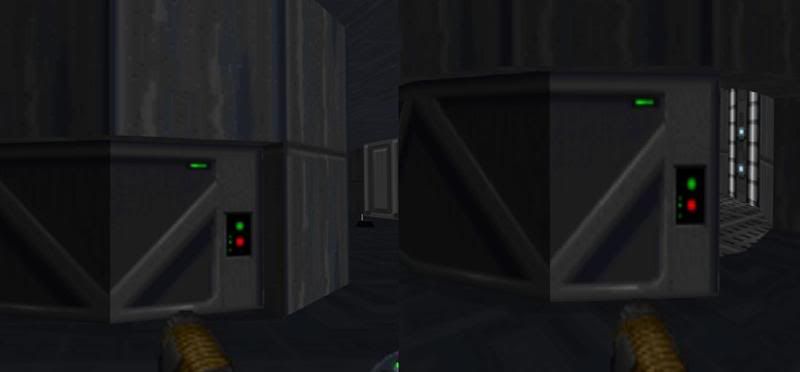
7. Texture flickering on backside of double action door. After entering through the large imperial logo door open the double action door and pass through. Turn around and look at where the door meets the ground after it closes while moving around a bit.
8. AI clipping issue. Saw a stormtrooper clip through the door to the room with the interrogation droids.
9. Two MSE-6 (mouse) droids are caught in the double action door. Look at the nook in the wall where the second door goes into. In the image you can only see part of one since that is after the second one got pushed even further in. Tested twice to make sure it wasn't a coincidence from something I did and they were there again. NOTE: Turns out it's a random chance they'll be stuck in there. Third time through they were moving about like normal. (Picture included)
10. In the original dark forces when a weapon wasn't capable of a secondary fire it showed a "--" instead of "00". (Picture included)
11. After dying, the final shot takes 10 away from your spawning shield making your start at 90 instead of 100 shield units.
12. Door stuck follow-up. You can get stuck in the large elevator revolving doors with no way to get out. (Picture included)
13. The lighting on one section of a revolving door is wrong due to it's default sector being in a better lit area. The door section keeps the same brightness as it moves. (Picture included.)
OTHER
1. Requesting the future alphas have some sort of debug option so that it will be easier to test certain things. Debug meaning mainly infinite ammo and a stop enemy fire option. For easier testing of collision and AI pathing. Hard to check certain AI characteristics when they keep crossfire killing. I understand AI isn't finished but there are some quirks I'd like to investigate further.
2. Since blaster shots are 2d, looking straight up and firing makes them "disappear".
IMAGES
Image1: Reference Bugs-1.
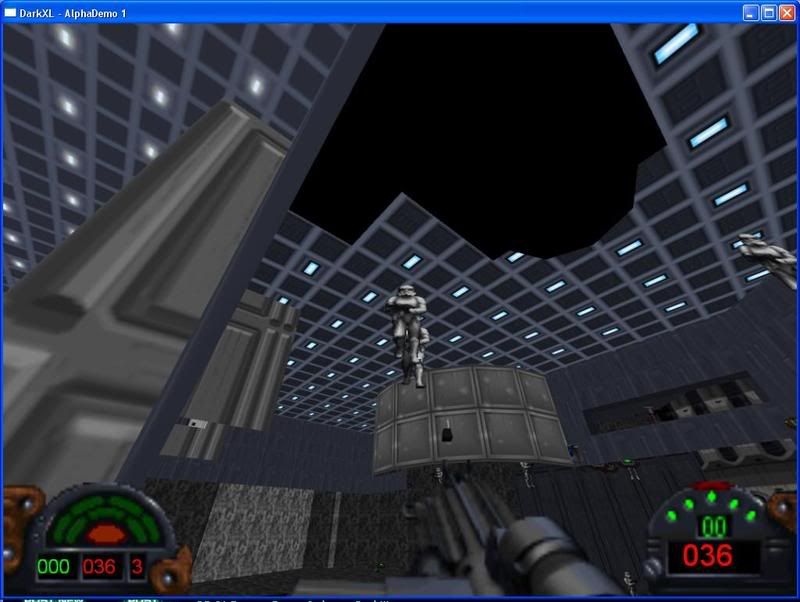
Image2: Reference Bugs-9.
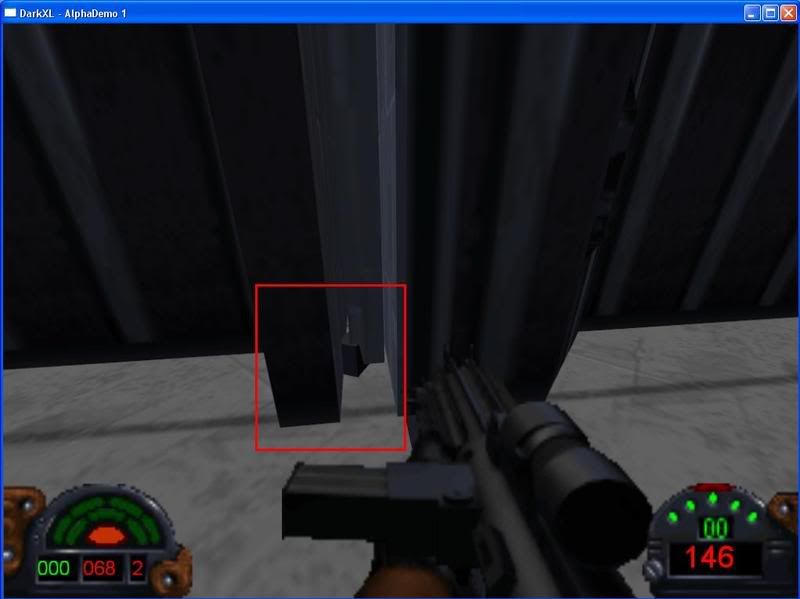
Image3: Reference Bugs-10
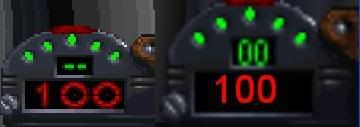
Image4: Reference Bugs-12
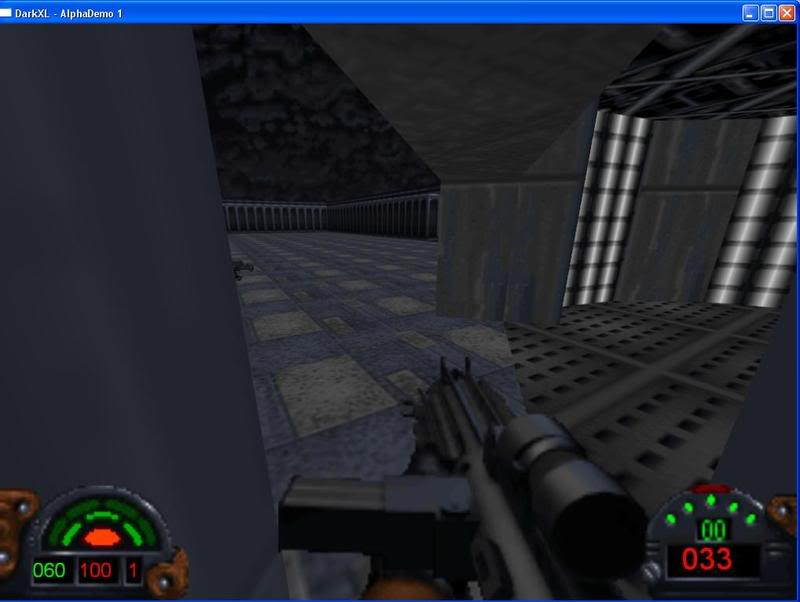
Image5: Reference Bugs-13 - Left is default, right is after movement.
Last edited by ZelRS on Apr 30, 2008 03:17; edited 14 times in total |
|
sweatervest
Ree-Yees
Joined: 22 Apr 2008
|
| Posted: Apr 29, 2008 23:54 Post subject: |
|
|
The third build is not showing up on the downloads page. It still directs me to the DarkXL_AlphaDemo_b2 file, and to make sure I ran it and it was the same version as before. I am assuming I should be looking in the DarkXL page under downloads where the first two builds are.
Also, I noticed a couple of bugs in build 2. In the secret room with all of the rifles and shields on shelves if the player tries to jump up into one of the shelves he will get stuck outside the level. Also, someone mentioned that the storm troopers play the wrong death animation, and I checked in DF and this is true, they should be flying straight back with their legs kicking out in front of them, instead of falling over like they do now (in build 2 at least).
Overall it runs really well though, I have an AMD Athlon 3500+ at 2.20 GHz, Vista 64 Ultimate, GeForce 8600 GTS, and an X-Fi and it runs ultra smooth, steady 60 fps (at least it looks like it), and no crashes.
|
|
lucius
DarkXL Developer
Joined: 17 Feb 2008
|
|
Magic_Al
Gamorrean
Joined: 22 Mar 2005
|
| Posted: Apr 30, 2008 00:21 Post subject: |
|
|
Because custom levels (almost) always worked with the Mac version, I think data files are pretty much the same as DOS except for Mac folder naming conventions. There's a good chance renaming things in a copy of the Mac version, so the hierarchy matches the DOS version, would make the data work with a Windows executable. Obtaining the demo of Dark Forces for DOS may provide the insight needed to do the renaming. I'll investigate this when I need a break from Grand Theft Auto IV.
_________________
----- MagicAl`s DARK FORCES Niche -----
http://wayback.archive.org/web/*/http://homepage.mac.com/anewmanagn/magic_al/
Armed only with a blaster pistol and an intimate knowledge of
Imperial methods, MagicAl prepares to go to lunch.... |
|
sweatervest
Ree-Yees
Joined: 22 Apr 2008
|
| Posted: Apr 30, 2008 00:33 Post subject: |
|
|
Oh that original link. Nevermind then, I just grabbed the third build.
I also remembered a couple of other bugs. The little explosion sprite from a blaster shot renders upright, as in if you shoot the ground near your feet the explosion gets really skewed instead of always looking like it is facing you. Also, in the room with the first elevator where you can look out over the stairs, I noticed that blaster shots will collide with the bottom edge of the wall unless you aim a little higher than straight on, while in DF you can aim much further down before your shots will hit the ledge. Finally, the firing timings now work but there is still a little too much lag for the pistol, as in the firing animation starts a little too late after I push the fire button. The shot is timed correctly with the animation and sound though.
|
|
sheepandshepherd
Trandoshan
Joined: 01 Apr 2008
|
| Posted: Apr 30, 2008 00:33 Post subject: |
|
|
I found a few more things:
-I get hung up on just about all of the stairs, even when going down them.
-Also, I still can't jump while I'm running, which has kept me from most of the secret areas, including the one with the interrogation droids.
-The elevators to the officer with the red key still shake when going down.
-The speed seems to be right now. I still suggest you add an option to change the game speed in the final release, but don't worry about it right now.
-It's hard to tell if you implemented this already, but in DF, blasters (only weapons that use the "Energy Units" ammo) lose power over distance; as in, you can kill a stormtrooper in two hits from a few feet away, but from about 20 feet away, it takes a few more than 2 hits to kill him. I don't know the specs on how fast blaster fire degenerates . . . I'm gonna go check to see if its in the Unofficial DF Specs and post it later if I find it.
-And one more thing - is there a screenshot key? If not, can you add one? I don't like having to copy and paste into paint using the Printscreen key because I can only save one screenshot at a time, and I have to keep switching between the two programs.
|
|
ZelRS
Dianoga
Joined: 23 Apr 2008
|
|
|